Löve Frames - The List Object
Return to Index

Information
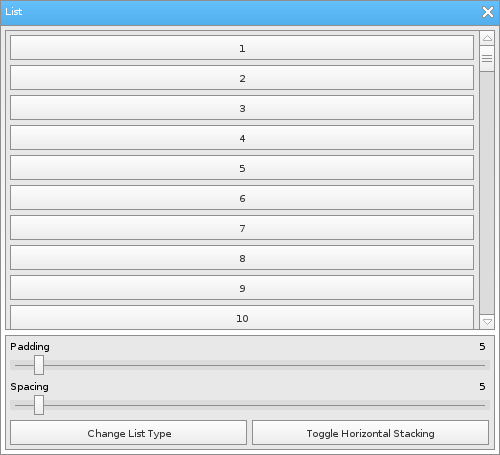
The list object displays multiple objects in a scrollable area.
The list object can be set to scroll vertically or horizontally.
Example Use
local frame = loveframes.Create("frame")
frame:SetName("List")
frame:SetSize(500, 455)
frame:CenterWithinArea(unpack(demo.centerarea))

local list = loveframes.Create("list", frame)
list:SetPos(5, 30)
list:SetSize(490, 300)
list:SetPadding(5)
list:SetSpacing(5)

local panel = loveframes.Create("panel", frame)
panel:SetPos(5, 335)
panel:SetSize(490, 115)

local slider1 = loveframes.Create("slider", panel)
slider1:SetPos(5, 20)
slider1:SetWidth(480)
slider1:SetMinMax(0, 100)
slider1:SetValue(5)
slider1:SetText("Padding")
slider1:SetDecimals(0)
slider1.OnValueChanged = function(object2, value)
	list:SetPadding(value)
end

local text1 = loveframes.Create("text", panel)
text1:SetPos(5, 5)
text1:SetFont(love.graphics.newFont(10))
text1:SetText(slider1:GetText())

local text2 = loveframes.Create("text", panel)
text2:SetFont(love.graphics.newFont(10))
text2.Update = function(object, dt)
	object:SetPos(slider1:GetWidth() - object:GetWidth(), 5)
	object:SetText(slider1:GetValue())
end

local slider2 = loveframes.Create("slider", panel)
slider2:SetPos(5, 60)
slider2:SetWidth(480)
slider2:SetMinMax(0, 100)
slider2:SetValue(5)
slider2:SetText("Spacing")
slider2:SetDecimals(0)
slider2.OnValueChanged = function(object2, value)
	list:SetSpacing(value)
end

local text3 = loveframes.Create("text", panel)
text3:SetPos(5, 45)
text3:SetFont(love.graphics.newFont(10))
text3:SetText(slider2:GetText())

local text4 = loveframes.Create("text", panel)
text4:SetFont(love.graphics.newFont(10))
text4.Update = function(object, dt)
	object:SetPos(slider2:GetWidth() - object:GetWidth(), 45)
	object:SetText(slider2:GetValue())
end

local button1 = loveframes.Create("button", panel)
button1:SetPos(5, 85)
button1:SetSize(237, 25)
button1:SetText("Change List Type")
button1.OnClick = function(object2, x, y)
	if list:GetDisplayType() == "vertical" then
		list:SetDisplayType("horizontal")
	else
		list:SetDisplayType("vertical")
	end
	list:Clear()
	for i=1, 100 do
		local button = loveframes.Create("button")
		button:SetText(i)
		list:AddItem(button)
	end
end

local button2 = loveframes.Create("button", panel)
button2:SetPos(247, 85)
button2:SetSize(237, 25)
button2:SetText("Toggle Horizontal Stacking")
button2.OnClick = function(object2, x, y)
	local enabled = list:GetHorizontalStacking()
	list:EnableHorizontalStacking(not enabled)
	list:Clear()
	for i=1, 100 do
		local button = loveframes.Create("button")
		button:SetSize(100, 25)
		button:SetText(i)
		list:AddItem(button)
	end
end
button2.Update = function(object)
local displaytype = list:GetDisplayType()
	if displaytype ~= "vertical" then
		object:SetEnabled(false)
		object:SetClickable(false)
	else
		object:SetEnabled(true)
		object:SetClickable(true)
	end
end

for i=1, 100 do
	local button = loveframes.Create("button")
	button:SetText(i)
	list:AddItem(button)
end
Event Callbacks
OnScroll - Called every time the list is scrolled
- Arguments passed: self [object]
- Arguments passed: self [object]
local list = loveframes.Create("list")
list.OnScroll = function(object)
	print("The list was scrolled.")
end
Methods
AddItem - Adds an item to the object
- Note: This method is used by the object internally. You should not use it unless you know what you are doing.
- Note: This method is used by the object internally. You should not use it unless you know what you are doing.
- Returns 1 value: display type [string]
- Returns 1 value: scroll bar [object]
- Returns 1 value: scroll amount [number]
- Returns 1 value: scroll amount [number]
- Note: Horizontal stacking only applies to this object when it's display mode is set to "vertical"
- Returns 1 value: stacking [boolean]
- Returns 1 value: dtscrolling [boolean]
object:AddItem(item[object])RemoveItem - Removes an item from the list
object:RemoveItem(item[object])CalculateSize - Calculates the object's size
- Note: This method is used by the object internally. You should not use it unless you know what you are doing.
object:CalculateSize()RedoLayout - Re-organizes the layout of the object's items
- Note: This method is used by the object internally. You should not use it unless you know what you are doing.
object:RedoLayout()SetDisplayType - Sets the objects display type. Can be vertical or horizontal.
object:SetDisplayType(displaytype[string])GetDisplayType - Gets the objects display type.
- Returns 1 value: display type [string]
local displaytype = object:GetDisplayType()SetPadding - Sets the object's padding.
object:SetPadding(padding[number])SetSpacing - Sets the object's spacing.
object:SetSpacing(spacing[number])Clear - Removes all of the object's items.
object:Clear()GetScrollBar - Gets the objects scroll bar.
- Returns 1 value: scroll bar [object]
local scrollbar = object:GetScrollBar()SetAutoScroll - Sets whether the object should auto scroll when a new item is added. If set to true, the object will scroll to the end of itself when a new item is added to it.
object:SetAutoScroll(autoscroll[boolean])SetButtonScrollAmount - Sets the amount that the object's scroll buttons will scroll the object's list items by
object:SetButtonScrollAmount(scrollamount[number])GetButtonScrollAmount - Sets the amount that the object's scroll buttons will scroll the object's list items by
- Returns 1 value: scroll amount [number]
local scrollamount = object:GetButtonScrollAmount()SetMouseWheelScrollAmount - Sets the amount that the mouse wheel will scroll the object's list items by
object:SetMouseWheelScrollAmount(scrollamount[number])GetMouseWheelScrollAmount - Gets the mouse wheel's scroll amount
- Returns 1 value: scroll amount [number]
local scrollamount = object:GetMouseWheelScrollAmount()EnableHorizontalStacking - Sets whether or not the object's list items should be allow to stack horizontally
- Note: Horizontal stacking only applies to this object when it's display mode is set to "vertical"
object:EnableHorizontalStacking(stacking[boolean])GetHorizontalStacking - Gets whether or not the object's list items should be allow to stack horizontally
- Returns 1 value: stacking [boolean]
local stacking = object:GetHorizontalStacking()SetDTScrolling - Sets whether or not the object should use delta time when caclulating how many pixels it's scrollbar needs to move
object:SetDTScrolling(dtscrolling[boolean])GetDTScrolling - Gets whether or not the object should use delta time when caclulating how many pixels it's scrollbar needs to move
- Returns 1 value: dtscrolling [boolean]
local dtscrolling = object:GetDTScrolling()